

AutoCAD has been around for a long time, and there are likely thousands, maybe even tens of thousands of commands buried in the code base.
Therefore, there are also likely a lot of commands you might not know.
Some of them can be incredibly useful and deserve to be in your back pocket. The ATTCYNC command is one of these commands.
Why the ATTSYNC Command Could be Worth Thousands
Not too long ago, I was working with another drafter on a telecom engineering drawing that had over 100 layout pages.

The drawing had come from another team, and the title block had several incorrect attributes. This could have taken hours to correct, if one of our drafters had to correct over 100 title blocks, one by one, it would have taken hours.
This would be very bad. The company’s internal cost for drafting was about $400 per hour (that might seem insane, but it’s not. Well, maybe it is. This is why engineering companies should outsource their drafting).
Correcting this title block issue could have cost thousands. Fortunately, it didn’t because the ATTSYNC command took care of the task in about five minutes. That’s thousands in reduced costs from one AutoCAD command.
That’s good value.
How the ATTSYNC Command Saves You All This Money
First, the ATTSYNC command just matches the attributes of all instances of a block in a drawing. It’s similar to the MATCHPROP command, but it works on block attributes.
In this drawing with over 100 instances of our title block, it reduced our workload by hours.
All we had to do was correct the attributes in one title block, select it, and run the ATTSYNC command.
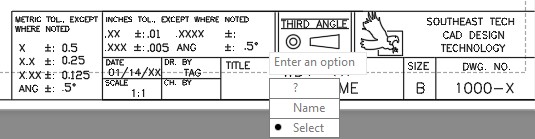
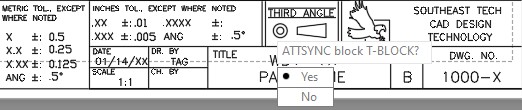
Boom. Done. Day saved.
Keep the ATTSYNC Command in Your Front Pocket
Some of the more obscure AutoCAD commands are incredibly useful in certain niche situations or in certain industries. However, you should definitely move the ATTSYNC command from your back pocket to your front pocket.
Electrical, architectural, civil, and many other types of drawings can have hundreds of instances of a certain block.
It’s easy to make a mistake in the block attributes, and place a lot of blocks with incorrect attributes. Or maybe a drawing needs revisions which require changing the attributes in a certain block which is used extensively in the drawing.
Therefore, it’s probably wise to keep this one in your quiver for quick use whenever you need it. It could be the difference between a profitable project and a disaster.
 Classical Manufacturing