Organizing your sketches is an underrated skill in parametric modeling. And it’s fair that most people don’t put a whole lot of thought into it.
After all, software with a unified feature timeline such as Solidworks and Autodesk Inventor kind of manage your sketches for you, because it automatically attaches the sketch to the features you use that sketch to create.
Fusion 360 works a little different. Sketches don’t get organized so automatically, and things can get… Messy.
This is why and how to organize your sketches in Fusion 360.
Does Organizing Your Sketches Really Matter?
Yes.
That’s it. That’s the answer.
More thoroughly, managing and organizing your sketches in Fusion 360 matters because they can get piled up under the main parent component in the model.
Even with good labeling, it gets very difficult to find the sketch you need when it’s time to revise a model.
This leaves two solutions: become such a proficient master of Fusion 360, engineering, design, and parametric modeling that you never have to make changes to your models.
Or organize your sketches.
For those of you who are still reading and don’t plan on simply dunking on every model you create, here’s how to manage your sketches in Fusion 360.
Leverage Components
It’s standard practice to create a new component and set that as the active component as the first steps in creating a new Fusion 360 model.
This does a lot of work in managing your model and making it easier to use in assemblies and perform manufacturing functions with your model.
It also does most of the work of organizing your sketches. When you create a sketch, it automatically gets nested in the active component, similar to the way Solidworks and Inventor handle sketches.
This saves you from creating an unmanageable monster the way I did in one of my first projects.
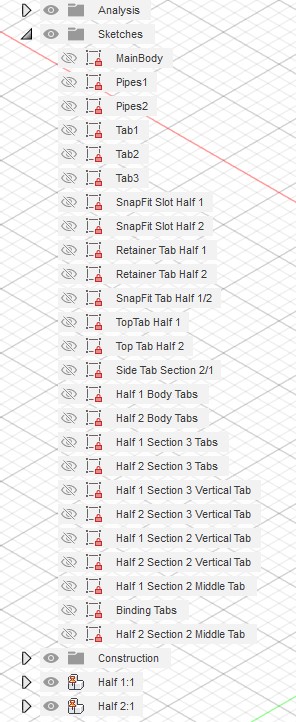
However, using components also minimizes the number of sketches you need to create your model.
If you look at the monster above, you might notice that most of these sketches seem to be repeated features.
I should have used components.
It would have been far more efficient to create a new component, draw my sketch, create features for the component, then just insert that component wherever I needed it in the model.
It could have been easy, but I did it the hard way.
Don’t be like shiny new designer me.
Do things the easy way.
To sum up, using components nests your sketches, makes your drawings neater and easier to manage, and it saves you from creating tons of unnecessary sketches and bodies.
Components are rad.
But What if I Forget to Create a Component or Get a Model With Poor Component Utilization?
This is a tragedy. But it’s not one of those dramatic tragedies where all the main characters die. It’s a little baby tragedy.
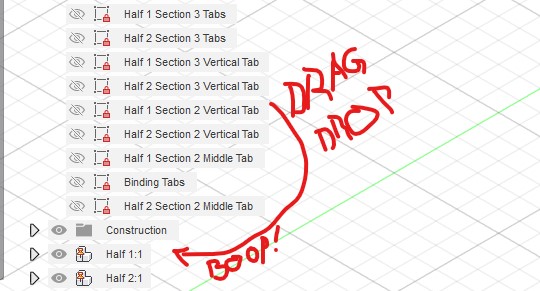
First, you can drag and drop sketches into new components.
If there are components in the model, but all the sketches are in the sketches folder for the main parent component, you can drag them to nest under the relevant component.
On the other hand, if the model consists of a bunch of bodies which are not components, you can right click the bodies and make a component from each body. Then you just do the ole’ drag and drop trick to nest the sketches where you want them.
The only drama here is if you have a sketch which was used to create more than one body.
If those bodies need to be separate components, the associated sketch has to stay nested under the main parent body because it is referenced by two components.
This can be a little irritating, but it’s not a game-ender. The model will still work, and you can still create copies of those components.
However, it’s best to create your components as you create your drawing. That way the sketches automatically get managed, and you don’t have to do any drawing cleanup later.
Better Organization Makes Better Designs
This might seem like a fairly trivial parametric modeling skill. It’s a simple skill to learn, though. It’s mostly a matter of building the appropriate steps into your workflow.
Actually, maybe it’s not even a skill…
No matter. Regardless of whether it’s a skill or habit, well organized sketches are easier to work with, less confusing for other team members, and they just look nice and neat.
And who doesn’t want nice and neat models?
 Classical Manufacturing